Burning Bridges

Car Jump AI Video Generator

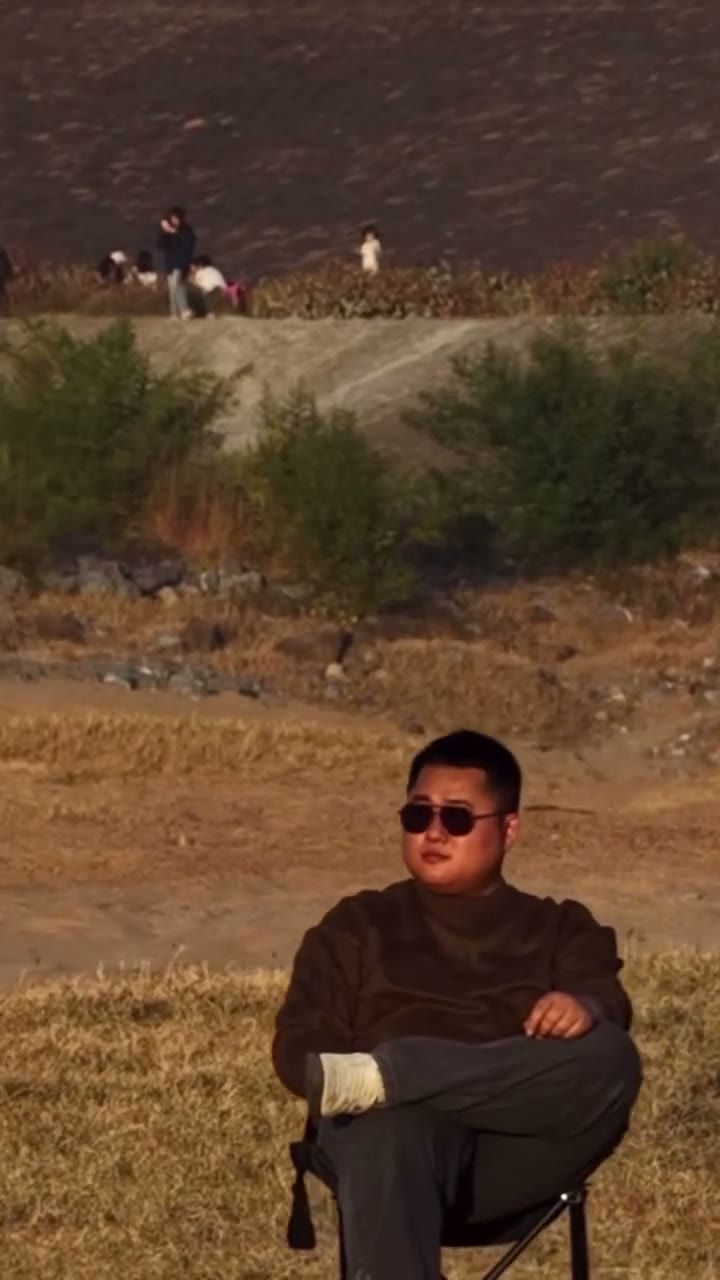
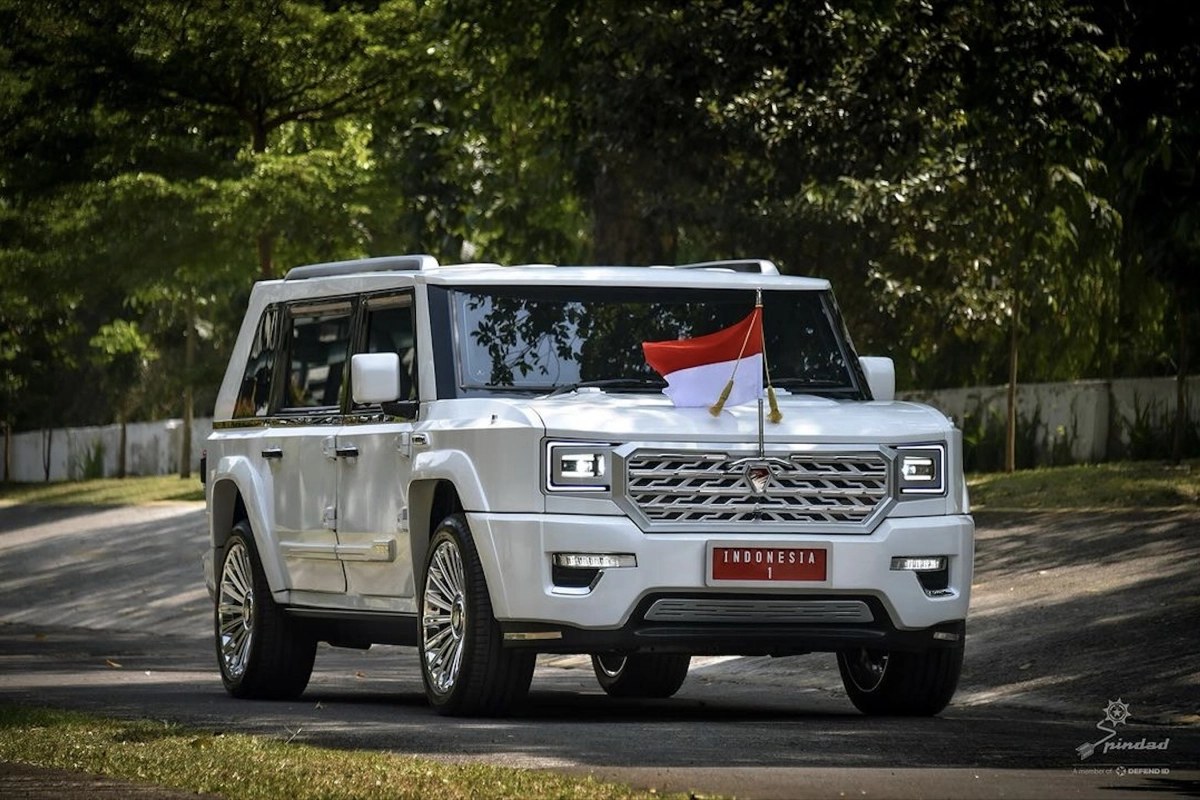
Make a Car Jump AI video from two photos: Photo 1 is the person relaxing in the folding chair, Photo 2 is the vehicle that launches behind them. The source clip and its soundtrack stay in place.

Create a video
Car Jump12s · Original soundtrack
@Image 1
@Image 2

By generating, you confirm you have rights to the photos and accept the use policy.

Open library

What is Car Jump AI?

Car Jump AI turns a person photo and a vehicle photo into a short stunt edit: someone stays calmly seated in a folding chair while a pickup or SUV launches into the air behind them, lands in a cloud of dust and rolls past. You pick both subjects without filming a stunt — the loaded reference supplies the chair pose, the outdoor setting, the camera and the timing. The clip shown here is a community example, not a promise of your result. Treat the scene as fiction and never try to imitate the jump or the close pass.

Make a Car Jump AI video in three steps

  1. 01

    Upload the person, then the vehicle

    Add the person as Photo 1 and the vehicle as Photo 2. Car Jump AI needs both, and the reference video is already loaded.

  2. 02

    Preview the stunt and your photos

    Play the Car Jump AI source and use Replace if either photo is wrong. Remove photos from the last slot first to keep their order. Changing inputs never starts a job.

  3. 03

    Sign in, generate and review

    Sign in to create your Car Jump AI video, then open My creations and watch the chair, the hand raise, the launch and the landing. Listen before downloading; if a finished clip is missing sound, use the audio retry instead of paying for a new generation.

Choose your Car Jump AI look

Photo 1 is the seated person

Photo 1 defines the character in the chair — face, hair, clothing and visible build. Use a clear shot with enough body for the seated pose; a face-only crop leaves the outfit to guesswork. Car Jump AI asks for black sunglasses in the style of the source character while keeping everything else from your photo.

Results can drift when the raised hand crosses the face, so keep face and hair unobstructed in the input. The community input shown here has the useful framing: face, torso and arms all visible. Only upload a person or character you have permission to transform.

Sunglasses are requested, not guaranteed

The Car Jump AI prompt makes one appearance exception: black sunglasses like the original. Glasses, expression and identity can still vary, especially around the hand raise near the four-second mark.

If the identity matters more than the sunglasses, pick a photo where the eyes and brow are clearly lit. Judge the result across the whole clip rather than the first frame.

Photo 1 is the seated person

Photo 2 is the vehicle

Photo 2 defines the vehicle that jumps. The source shows a pickup mostly from the front and front three-quarter angle, so pick a photo with the full body, wheels, lamps and grille in view. A side-only shot leaves the front end open to interpretation.

The SUV used in the community example shows this angle well. Car Jump AI can reinterpret badges, plates and small trim, so check them in the result — a changed badge is expected, a vehicle that changes shape or leaves the jump path is not.

Match the angle the jump actually shows

For the launch, a front three-quarter photo gives Car Jump AI information about both the grille and the body. Keep all four wheels inside the frame and avoid a tiny car lost in a busy background.

Watch the body, wheels, lamps and grille from take-off through the landing and as the vehicle passes behind the chair. Those moments reveal whether the vehicle reference held up.

Photo 2 is the vehicle

What stays fixed in Car Jump AI

You choose the person and the vehicle; the performance, frame and slot order stay fixed. Car Jump AI follows the roughly 12-second source in a vertical 9:16 frame with no length picker — trim the download in your own editor if you need a shorter cut.

Car Jump AI starts at 480p, with 720p and 1080p in Settings. Resolution changes the estimate and file detail; it doesn't guarantee identity, vehicle markings or realistic physics.

Soundtrack, credits and responsibility

The finished Car Jump AI video keeps the soundtrack from the reference clip. Page previews start muted, so use the player when you want to listen, and publish that audio only where you have permission.

Read the estimate beside Generate before submitting; preparing photos spends nothing. Template access does not confirm permission to republish the source footage, community examples or soundtrack. Make the stunt digitally — never in real life.

What stays fixed in Car Jump AI

Car Jump AI: your questions answered

How many photos does Car Jump AI need?

Two: Photo 1 for the seated person and Photo 2 for the vehicle. Both are required, and the second photo is never treated as another person.

What vehicle photo works best?

A clear front or front three-quarter view of the whole car, truck or SUV, with wheels, lamps and grille visible. Side-only or tightly cropped shots give the edit less to work with.

Will my person really wear sunglasses?

The prompt requests black sunglasses like the source character. That's a request, not a guarantee — glasses and identity can vary, especially when the hand crosses the face.

How long is a Car Jump AI video?

About 12 seconds, vertical 9:16, following the reference. There's no duration picker; trim the download yourself if you need a shorter version.

Does Car Jump AI keep the original sound?

Yes, the finished video keeps the reference soundtrack. If a result is missing audio, use the audio retry on that result instead of generating again.

Can I change the desert setting?

No. The reference supplies the field, the jump, the dust and the camera. For a different scene, create one in the AI Video Generator.

Does Car Jump AI cost credits?

Generating needs an account with enough credits for the estimate shown beside Generate. Uploading and previewing are free; signup credits may not cover the job.

Where do I find my Car Jump AI video?

In My creations or your video history. Watch the chair, hand raise, launch and landing with sound before downloading.

A new role in every scene

Choose your next AI trend

From solo performances to a full dance cast, find the scene for your next photo.

Make your Car Jump AI stunt

Pick the person for the chair and the vehicle for the jump, check the estimate and let the reference do the stunt — safely, on screen only.

Try Car Jump AI